Sila — from the Arabic صِلة, a bond, a tie, the connection between two people. The root shows up in ṣilat al-raḥim, the obligation of kinship ties, so the word carries a relationship rather than a wire. That is the whole thesis: a machine you have a relationship with, not a tool you operate.
About
Sila is a personal operating system. Not a desktop theme and not a distribution with a new wallpaper — a fourth download button next to macOS, Windows and Linux, with its own setup, its own updates, its own accounts, its own security model and its own reviewed store.
It runs today on real hardware on my desk. It boots straight into its own desktop, has no desktop environment underneath it, updates itself over the internet from signed releases, and falls back to the previous version on its own if a release does not boot.
The mark is two identical brackets, one rotated 180° about the centre. Neither of them contains the square between them — that square only exists in the distance the two brackets hold, and it stays open at two corners. The bond is the gap, not either party.
The idea
Every operating system ships one interface, designed once, for everybody. It has always been that way, which makes it easy to assume somebody chose it deliberately. More likely it is an accident of how software gets built: an interface written in code has to be written by somebody, and once it is written, it goes to everyone. The settings offered afterwards are apologies for that fact, not answers to it.
Sila is a bet that a machine can be arranged around the person using it — at the level where the screen is actually decided, which is the operating system and nowhere else. An app cannot make a computer feel like yours. It can only be a good app on somebody else's computer.
The enabling trick is that a screen is described rather than compiled. An app declares what it can do — a list of capabilities, and nothing about where they appear. A small document says which of those go where. The part that draws has never heard of a temperature or a file; it receives shapes and sizes and nothing else, and there is a check in the build that fails if anything outside one single file learns how to draw.
That constraint is what lets the interface differ per person without shipping different software to each of them. It is genuinely load-bearing, and it is still plumbing. Optimising for the plumbing rather than the point produced, in an early version, a screen showing six tiles of CPU temperature — a triumph of the mechanism, and something nobody would ever want.
Where the line falls, after building a real desktop on top of it: a window's contents is a document. The furniture — the taskbar, the start menu, the frame around a window — is not. Furniture changes at the speed of a hand, and being a document buys nothing at that rate.
What actually runs
A working system first; the interesting part second. Today the machine does all of this on its own:
A desktop, not a demo
Taskbar, start menu, apps with their own icons, a Files app, a Settings app with real sections, wallpapers and a dark theme — all of it persisting across reboots and across updates. There is no desktop environment underneath. The interface is what the machine boots into, with nothing behind it to fall back to.
Two complete systems on one disk
The disk carries two full copies of the operating system, A and B. An update writes the one that is not running and flips a pointer. The partition holding your files is never touched by an update.
Signed releases, over the air
Nothing installs unless it chains back to a key the device already trusts, and the signing key that reaches the internet is not the key that anchors that trust. The refusal is the feature, and it is tested by trying to install a forgery and watching it fail.
It rolls itself back
A release that does not boot is not a support call. The machine gets a fixed number of attempts, and if none of them reach a healthy system it returns to the version that was known good. This has happened for real: a release shipped with a bad reference, the machine dropped out mid-update, and it put itself back on the previous version with nobody watching and nobody asked.
Updates are small
A whole release is about 330 MB. Because the system image is built deterministically — the same inputs produce the same bytes every time, down to timestamps — a device can work out which parts it already has and fetch only the rest. A one-file change costs 7.9 MB instead of 330 MB, a 41× reduction, verified byte for byte against what the server actually sent.
The name is a build parameter
The name never appears as a literal anywhere in the system. It is set once, in one place, and a check fails the build if it is hardcoded anywhere else. Renaming the entire operating system is a one-line change.
What it is actually for
None of the above is the reason Sila exists. It is the floor — the competence a personal machine has to stand on before anything personal can be built on it. Nobody falls in love with a taskbar.
What comes next is presence: something in the machine that knows you, that you talk to in text, and that acts on the system rather than chatting beside it. Closer to Cortana in Halo than to a search box — an intelligence bonded to one person, where the relationship is the product rather than a feature of it.
Deliberately not voice. I am hard of hearing, and almost every assistant built today is useless to me — and to anyone in a loud room, a quiet office, or who simply does not want to talk out loud to a computer.
Sila Account
A companion app for iPhone and Apple Vision Pro. Your machines are there — what they are doing, how much of them is in use, which version each side of the disk is holding, and eventually your files.
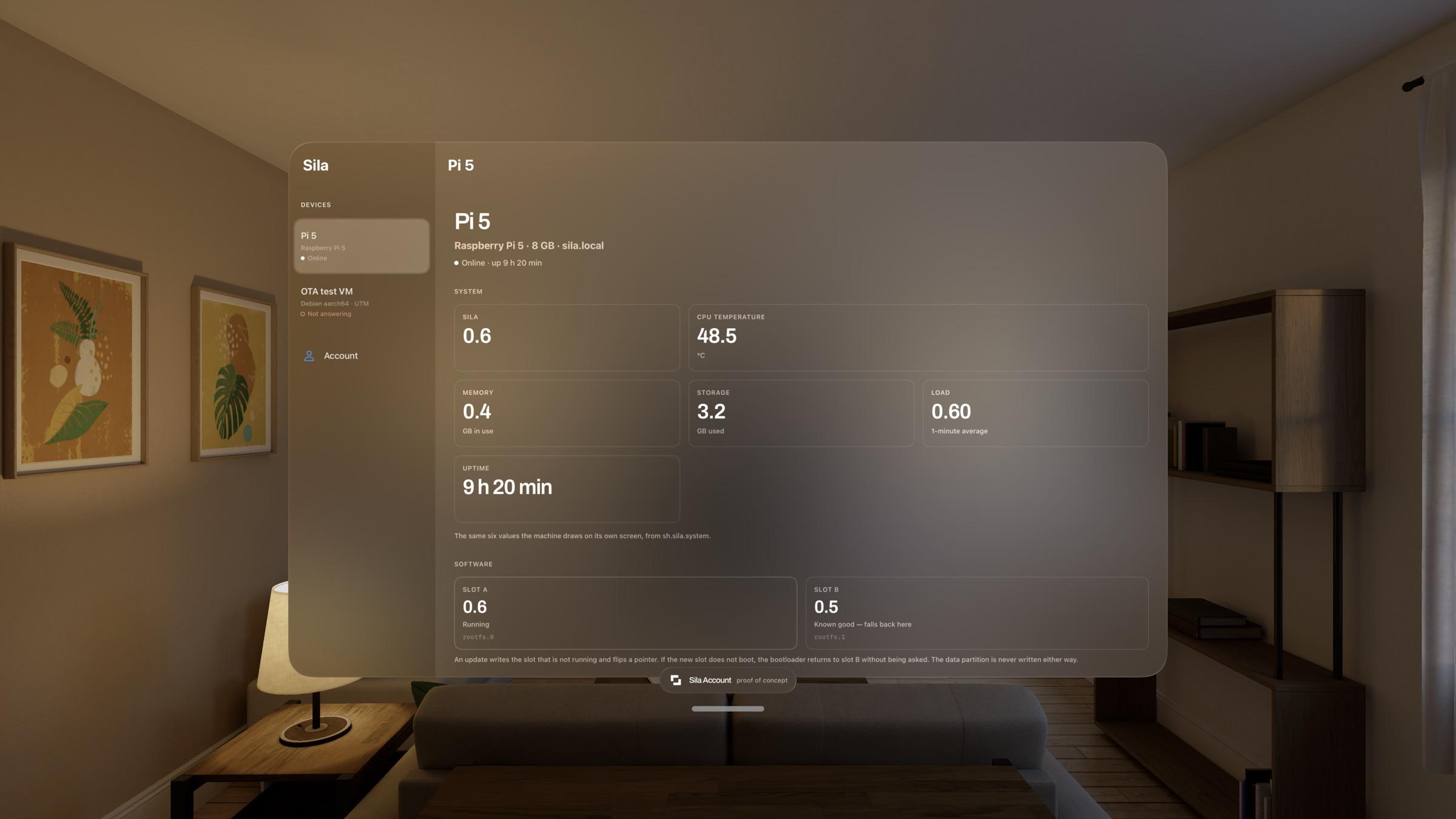
It reaches a machine on the same network with no account and no internet, pairing against a code shown on that machine's own screen. Signing in adds reach from anywhere; it does not unlock anything.
That line is not a detail — it is the rule the whole product is held to. An account makes your devices easier to reach, never necessary to use. A Sila machine with no account and no internet is a complete machine.
The pitch for the rest: this is iCloud, except the cloud is your own computer. No storage tier, no subscription, no monthly negotiation for space you already paid for — it is your SSD, and the app is a window onto it from wherever you happen to be.
How it is built
The whole system is assembled from scratch by a pipeline of numbered, idempotent steps — lay down the base, install what is needed, brand it, add the interface, set up updates, then write the disk. Any step can be re-run from any point without repeating the ones before it, which is the difference between a twenty-minute iteration and a two-hour one.
There are 907 tests. They did not catch roughly thirty of the defects found so far — every one of those built cleanly, passed every static check, and did not work on the actual hardware. Almost all of them were the same shape: a name fixed in one place that is not stable in another. An identifier the update itself replaces. A path that only exists on one of the two copies. A value belonging to the build machine that got shipped to every device that would ever run it.
The method that works is not more tests. It is getting a known-good control before forming any hypothesis, and showing a check fail before trusting it to pass.
Where it goes
The order is by risk, not by layer, so the unproven idea gets tested before the laborious plumbing is finished.
| Done | A desktop that persists across updates · bootable system · the interface as the session · two-copy updates with signing and automatic rollback · small updates · a companion app that works with no account |
| Next | Live data in the interface · windows and multitasking · a developer kit and a reviewed store |
| After | Presence — an intelligence bonded to one person, in text |
| Eventually | Dedicated hardware, and a base that is entirely its own |
The last step is the reason the rest exists, and it is deliberately last. A fourth option beside Windows, macOS and Linux cannot be a fifth Linux distribution — but it also cannot be a research demo that does not boot.
More at sila.sh.